
Back Tap, for your Mac.
Knock twice anywhere on the body and it fires a keyboard shortcut, or runs any macOS Shortcut. Palm rest, lid, bottom case, the deck beside the trackpad: there is no spot to find, because Tunk reads the accelerometer already inside the machine at 796 Hz and picks your deliberate knock out of everything else the laptop feels.
Apple silicon, macOS 13 or later. Signed ad hoc, so macOS asks twice. Source on GitHub.
Two taps, two actions
A single tap and a double tap each bind to their own action, the way Back Tap gives Double Tap and Triple Tap separate rows. Pick a hotkey, pick a Shortcut, or leave one unbound.
-
Single tap
One knock on the chassis. Ships unbound, on purpose: every mug set down and every footfall is also one transient, so a single tap is a far weaker signal than a pair. Bind it if you want it, knowing that.
-
Double tap
Two knocks in quick succession, inside a join window of about 220 ms. This is the gesture Tunk is built around, because requiring two deliberate onsets is what keeps the world from triggering it.
-
Triple tap
Three knocks inside the same join window. Wired now, and unbound until you bind it: of the three it is the hardest to fire by accident, because nothing you do to a laptop by mistake knocks it three times on a beat.


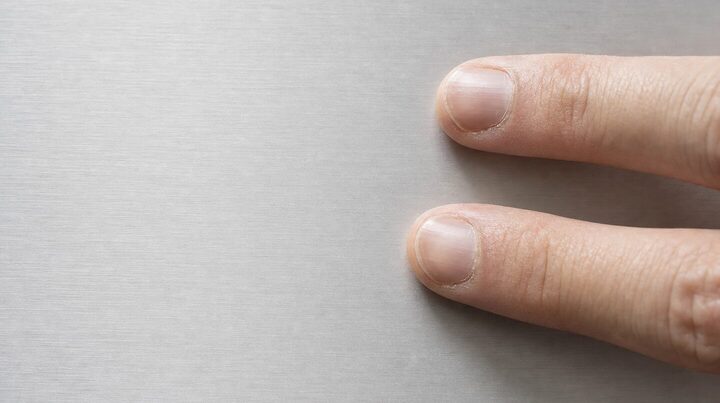
Knock twice on the photograph. The demo joins taps inside 400 ms; the detector uses 220 ms.
What a tap can fire
A key combination, or anything you have built in Shortcuts
Tunk posts a real key event, so any app already listening for a global hotkey answers it: mute the call, play or pause, skip a track, take a screenshot, start a recording, toggle dictation. Bind a Shortcut instead and a tap runs whatever that Shortcut does. A fresh install sends ⌃⌥⌘; on a double tap, and nothing on a single one.
A global hotkey
⌃⌥⌘V
You choose the combination. Pick a rare one, because Tunk posts it into whatever is focused. Left and right modifiers are kept distinct, since an app bound to the right-hand key ignores the left one.
A macOS Shortcut
shortcuts run “Start dictation”
Picked by name from your Shortcuts library. Tunk spawns it directly rather than going
through the shortcuts:// URL scheme, which measured up to 345 ms on its own
and raises a modal dialog when a name does not resolve.
Nothing
unbound
The default for single tap. A gesture with no action bound is detected, counted in the tap monitor, and then dropped.
Right Shift is refused as an emitted binding, with an explanation rather than silence. It stays yours as the manual VoiceInk key, and a synthesised one would collide.
A worked example, because it is what Tunk was built for: VoiceInk takes the combination as its Second Shortcut in toggle mode, so tapping the case starts and stops dictation and the shortcut you already use keeps working.
Three screens.
Turn it on and watch taps land. Bind what a double tap does. Teach it your knock. Experiments stay under Advanced, switched off.


How it works
Five steps. Finding the onset is the hard one
Tunk never touches the microphone or the camera. It reads one motion sensor, and everything else is signal processing.
-
Read the sensor
Apple Silicon MacBooks carry an accelerometer on the SPU, reachable over HID. It sits idle until you set a report interval, which is the whole trick. Set it and the stream arrives at a measured 796 Hz, one sample every 1.25 ms, unbatched, with sensor-to-callback latency of 0.34 ms at p95.
-
Find the onset
A finger striking aluminium makes a sharp transient: energy appearing in a couple of milliseconds and decaying fast. Tunk looks for that shape rather than for loudness, because loudness alone is what a closing lid and a dropped phone also have.
-
Group the beats
Onsets close together in time become one gesture carrying a count. A group fires one confirm window after its last onset, not instantly, which is what lets triple tap arrive later without changing how double tap feels.
-
Suppress while you work
Every keystroke, trackpad click and trackpad touch opens a short suppression window during which onsets are discarded. Typing is the main way a tap detector fails, and this gate is the defence. The tradeoff: you cannot trigger Tunk mid-word.
-
Dispatch
A confirmed gesture posts your key combination, or spawns your Shortcut by name. Tunk checks a Shortcut still exists before running it, and a missing one fails quietly into an error state in the menubar rather than raising a dialog under your hands.
The problem, drawn to scale
What a laptop feels when nobody taps it
Both traces below are real recordings from the dataset, drawn at the same vertical scale. Neither produced a trigger. The detector has to sit above this and still answer a fingertip.
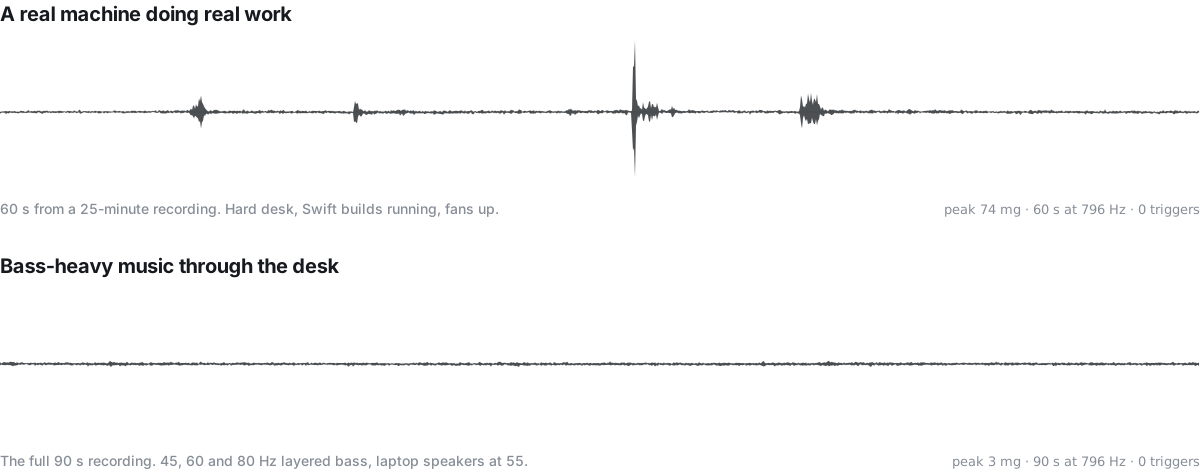
data/raw. Vertical axis is deviation from the resting
1 g reading. No smoothing beyond a min and max envelope per pixel column, which keeps
every peak.
Honesty
What has been measured, and what has not
Detectors are easy to lie about, so here is the ledger. The left column came off real recordings on real hardware. The right column is unknown, and stays blank until it isn't.
Measured
- Sensor rate
- 796 Hz
- Sensor to callback, p95
- 0.34 ms
- False triggers, recorded desk use
- 0 in 28 min
- Idle CPU
- ≈ 2%
Sustained and unbatched. 1.25 ms is the interval the sensor is asked for; 796 Hz is what it delivers.
Transport costs under a millisecond, so the budget goes to the decision.
Real sessions: Swift builds and fans on a hard desk, plus layered 45, 60 and 80 Hz bass through the same desk.
Continuous sampling on an otherwise idle machine.
Measured on one machine: an M4 Max MacBook running macOS 26.5.
Not measured yet
- End-to-end latency, from your second tap to the key arriving in the app. The 209 ms is the detector replayed; posting the key is not in it.
- A bed, a cushion, or any surface soft enough to swallow the knock outright.
- A closed lid, docked to an external display. Never recorded, and a shut machine couples the knock differently.
- Any MacBook other than the one it was built on.
- Battery cost over a full charge cycle.
These stay blank until the harness produces them, pass or fail.
How reliability gets decided
Rather than a number chosen to sound good, the build runs a method. A capture tool logs the raw sensor stream with timestamps and ground-truth labels. Part of every recorded category is held back as a test set the tuning never sees, so a threshold cannot be quietly fitted to the exam. A scoring harness replays those recordings through the same detector code that runs live, sample for sample, with no clock in the decision path, so a replay and a real tap produce identical results. Separate critic agents run that harness and report the gap.
The felt reference for acceptance is Back Tap on an iPhone. A build that scores well and still feels like it is ignoring you has not passed.
What it needs
An Apple Silicon MacBook
The sensor lives in the laptop. A Mac mini, Studio or Pro has nothing to tap. Built and measured on an M4 Max, macOS 26.5.
Two permissions
Input Monitoring to read the sensor and see keyboard and trackpad activity for the suppression gate. Accessibility to post the key event your tap is bound to.
Nothing else
Menubar only, no dock icon, no window beyond a small settings panel. No microphone, no camera, no network. Nothing leaves the machine.
Running in four steps.
- Open the DMG and drag Tunk onto Applications.
- Open it from Applications. Tunk lives at the right-hand end of the menu bar and has no Dock icon.
- Grant two permissions. A window opens on first launch: Input Monitoring to read the accelerometer, Accessibility to press the key. Each row opens the right pane for you, and the window notices the moment you come back.
- Double-tap the case. Palm rest, lid, or the deck beside the trackpad. The ring lights up for each knock it hears.
Tunk 0.2.1
Download Tunk 0.2.1This build is signed ad hoc, not with a Developer ID. On a Mac that is not the one it was built on, macOS will refuse to open it and say it cannot verify the developer. Opening it from the right-click menu is the usual way past that, and a notarised build is the real fix. It is also why macOS asks for both permissions again after every update: a grant belongs to one signature, and each build makes a new one.
Questions
What is Tunk?
Tunk is a macOS menubar app that turns a physical tap on your MacBook's body into an action. You double-tap the chassis and Tunk fires a keyboard shortcut you chose, or runs any macOS Shortcut. It is the same idea as Back Tap on iPhone, where tapping the back of the phone runs an action, applied to a laptop. Tunk reads the accelerometer built into the machine rather than using the microphone or the camera.
How does Tunk detect a tap?
Tunk reads the accelerometer that Apple Silicon MacBooks expose over the HID interface, at a measured 796 Hz. It looks for sharp transient onsets in that stream and groups them by the interval between them, so two deliberate onsets close together read as a double tap. It also watches keyboard and trackpad activity and suppresses onsets for a short window after each one, which is how typing is kept from triggering it. A consequence of that gate is that you cannot trigger Tunk in the middle of typing.
Can I download Tunk yet?
Yes. Version 0.2.1 is on this page, signed ad hoc. The sensor layer, the action dispatch and the recording harness all work. Detection on a lap is still 16 of 20 against a 98% bar, so read the measured numbers before you rely on it.
Will typing set Tunk off?
Preventing that is the main design goal, and it is not yet proven. Two mechanisms work against it: a double tap requires two deliberate onsets inside a narrow window, and detection is suppressed for a short gate window after every keystroke and trackpad event. Across 28 minutes of recorded real desk use, which included Swift builds, fans and bass-heavy music through the desk, the current build produced zero triggers. A typing false-positive rate on a dedicated typing set has not been measured yet, so no rate is claimed here.
What can a tap do?
A tap can post a global hotkey of your choosing, or run a macOS Shortcut by name, or do nothing. Single tap and double tap each bind to their own action, the same way Back Tap gives Double Tap and Triple Tap separate rows. Single tap ships unbound by default, because a single transient is a much weaker signal than a pair and every mug set down produces one.
How do I use Tunk for hands-free dictation?
This is the use case Tunk was built for. In VoiceInk, open Settings and then Shortcuts, add a Second Shortcut bound to a rare key combination, and set its recording mode to toggle. Then bind Tunk's double tap to that same combination. Tapping the laptop starts dictation and tapping again stops it, and your existing manual VoiceInk binding keeps working untouched. Tunk deliberately refuses to emit a bare Right Shift so that it never collides with the default VoiceInk primary shortcut.
Which Macs does Tunk work on?
Tunk needs the accelerometer that Apple Silicon MacBooks expose through the SPU HID interface, so it is a laptop-only app. Every number published so far was measured on one machine, an M4 Max MacBook running macOS 26.5. Other Apple Silicon MacBook models expose the same sensor interface, but Tunk has not been measured on them yet.
What permissions does Tunk need?
Two. Input Monitoring, so Tunk can read the accelerometer and watch keyboard and trackpad activity for the suppression gate. Accessibility, so it can post the key event your tap is bound to. Tunk runs with the App Sandbox off, which is what reading the sensor requires. It sends nothing off the machine.
Does Tunk drain the battery?
Tunk samples continuously, so it always costs something. Measured idle CPU is about 2 percent on the machine it was built on. Battery impact over a full charge cycle has not been measured and is not claimed.
Does Tunk use the microphone?
No. Tunk reads only the accelerometer, a motion sensor. It never opens the microphone or the camera, and it sends no data off your machine.
It is not finished, and that is the point of this page
The sensor works and the actions fire. Recordings are stacking up. What is left is the part that decides whether the thing is any good: proving the detector answers a real tap and ignores a real day. This page said the numbers would go here when they existed, whatever they said. They exist, and one of them is bad.
- Detection, hard desk — held out
- 20 of 20
- Detection, soft surface — held out
- 20 of 20
- Detection, on a lap — held out. The bar is 98%.
- 16 of 20
- Detector latency, 95th percentile, replayed. The bar is 250 ms. Dispatch is not in it.
- 209 ms
- False triggers while typing, 11.7 minutes recorded
- 0
Measured by replaying real recordings the tuning never saw, on one operator and one machine. Lap fails, and the reason is still open. This page briefly blamed the sensor's bandwidth; that rested on a spectrum measurement that had left gravity in the lowest bin, and corrected, the sensor is usable to about 150 Hz. Twenty-one approaches were built and graded against recordings their author could not see, and three further reviewers were asked to disprove the conclusion rather than support it — two of them broke it. What stands is narrower: on this corpus lap does not reach 98% inside the latency budget, and nobody has beaten 19 of 20. The typing zero is real, but 86% of that time the detector is deliberately muted by keyboard activity, so the honest exposure is 1.6 minutes, not 11.7.
The source is public, and so is every rejected experiment behind it.